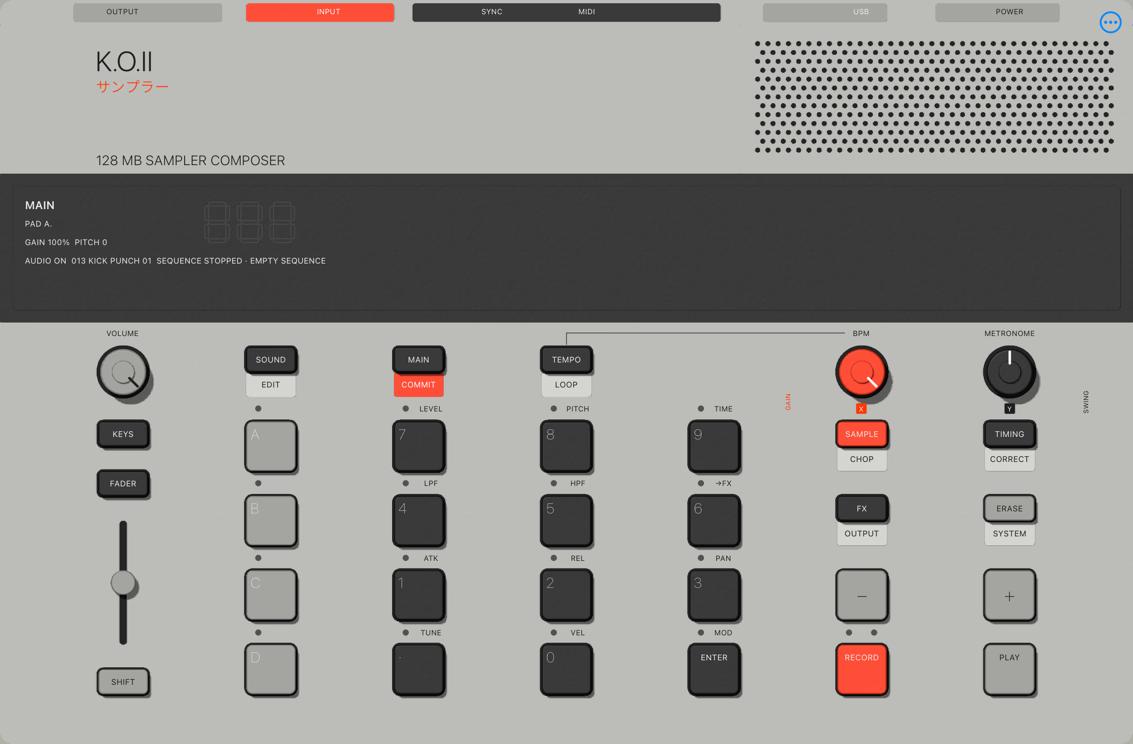
A retrospective on an ongoing personal project. I act as the product lead, defining the vision and quality standards; AI agents handle coding, testing, and documentation. Features observed on the Simulator are clearly distinguished from unverified iPad-native behaviors. Inspired by the EP-133 workflow, this project has not yet proven audio or behavioral parity with hardware.
Context
Nomad Engineer SS01 is a native sampler/composer prototype for iPad. Its operation is inspired by the EP-133 workflow: 12 pads, four groups, and button combinations. The instrument surface is built using Metal to look and respond like a physical object, with swappable skins.
My role is product designer, not coder. All source code, tests, and technical documentation are written by AI agents. My work involves product decision-making, visual direction, and proof-of-concept validation.
The starting point was a brief containing product definitions, a design system, architecture, and research. The original brief describes a modular groovebox where users customize the machine itself, not just the color.
The Challenge
This is not a typical app for agents. Three tensions emerged immediately:
- Scope is not an MVP. The brief explicitly states no features can be quietly deferred due to difficulty. The plan is divided into nine major packages, most locked until the previous package is proven.
- Reference standards are unmeasurable. 291 requirements were extracted from official manuals at a partial level, and there is no physical hardware to measure audio against.
- Designer does not read code for verification. Trust must come from the process: scope is documented, evidence is documented, and unverified items are clearly marked.
The Process
Documentation is the interface between designer and agent
Before the first line of code, a set of foundational documents was created: brief, architecture, design system, and roadmap. Every decision has exactly one owner document; others only link to it. Agents follow four core rules:
- Only work on tasks approved as ready, within the defined scope.
- Do not invent product scope or visual direction.
- Keep evidence, decisions, plans, and verified status separate.
- Do not report planned work as completed.
Small work packages with gatekeeping
Each task is a feature packet: desired outcome, scope, exclusions, acceptance criteria, test commands, and agent-recorded results. As of October 8, 2026, the documentation records 79 work packages. "Ready" only grants permission to work on a limited scope, not completion.
Multiple agents, one orchestrator
An orchestrator agent writes the work packages, runs builds and tests, and reads all reports before logging them. Worker agents receive narrow file scopes; production code and tests are usually assigned to separate workers to ensure independent verification. Physical interaction on the iPad mini simulator uses computer use.
Steering by decision, not by code
Every designer intervention shifts the work direction:
- Rejected an agent's attempt to remove an audio library without asking; prioritized reuse over writing new code.
- Finalized skin order: Classic, Aluminum, AMOLED screen, Medieval.
- Requested the interface be built first from physical hardware designs, at a 176:240 ratio.
- Reflected the jagged edges and gray bars on the sides of the screen, leading to a surface that auto-scales to full screen.
- Shifted priority to functional buttons and knobs that emit sound before visual polishing.
- Requested tactile button depression and faders that respond to touch.
Common ground: designers don't just fix bugs; they fix priorities and perceived quality standards. That is the part an agent cannot decide on its own.
Solution
A few moments showing how this approach works:
- Reusing code only to discover library bugs. Retriggering the same note causes latency. Instead of rewriting the sampler, the project added an option to the library clone with source attribution.
- Bugs only appear when resizing audio blocks. Work packages are marked as "written, not accepted" until fixed, without loosening tolerances.
- Audio on the virtual machine is broken for unknown reasons. A test using only Apple's API was built specifically to isolate environmental errors from project errors, concluding that the cause remains unproven.
- From looking like it to feeling like it. The Classic surface went from shapes, shadows, and full-screen scaling to 19 buttons with 1.2 mm depression and responsive faders in two days.
- The PLAY button took two days. From pattern data to the moment PLAY runs and stops, it took over twenty work packages regarding clocks, note ownership, and command receipts.
- Limits beyond the code. The first installation on a real iPad failed because the free signing account only allows three apps.
Results
The most recent functional proof was recorded on the iPad mini Simulator as of 05/10/2026. This is the progress of a prototype, not a finished product. Images in this post were captured from the app installed on the Simulator on 08/10/2026; they represent the interface and do not replace audio verification on a real device.
Functional on iPad mini Simulator: full-screen Classic surface in both orientations; 12 pads and four A–D groups; audio file import; 12 starter sounds and a library of 320 original sounds; volume, gain, and pitch per pad; depressed buttons and faders; PLAY run and stop.
Missing: recording, chopping on the main surface, effects, scenes and complete songs, project saving, MIDI, WAV export, Aluminum and Medieval skins, iPhone version.
Lessons
- Evidence-based discipline over code-reading ability. State always comes with baggage, so know exactly what remains unproven.
- Break it down until it's testable. Narrow work packages, two separate agents for code and testing, keeping even the failures. The cost is many work packages for an incomplete app.
- Non-MVP scope has a price. Five days created a very solid foundation, but the user has only touched a small part of it.
- Documentation written for agents is hard for humans to read. A separate summary layer is needed for decision-makers.
- Agents need someone to uphold perceived quality standards. Aliasing, gray gaps, buttons that don't depress: tests pass, but only a human eye sees that it's not good enough.
- There are walls that aren't code. Signing accounts, locked devices, glitchy virtual audio, real machines for benchmarking.
Next steps: step recording, sampling, effects, project saving and file export; verification on a real iPad; then the Aluminum skin and iPhone version.